Zorya Astro brings together precise astrology calculations, an intuitive interface, and modern technology to help you work faster, explore more deeply, and feel at home.
Johannes Kepler · December 27, 1571 (Julian), 14:37 LMTWeil der Stadt · 48n45 8e52 · Placidus, tropical zodiacfrom his own records; source: Astro-Databank, rating B
☉︎Sun: 15°27′ ♑︎ CapricornHouse VIII Speed +1°01′
☽︎Moon: 4°01′ ♊︎ GeminiHouse XII Speed +12°25′
☿︎Mercury: 5°34′ ♑︎ CapricornHouse VII Speed +1°33′
♀︎Venus: 18°35′ ♑︎ CapricornHouse VIII Speed +1°15′
♂︎Mars: 8°16′ ♎︎ LibraHouse V Speed +0°23′
♃︎Jupiter: 18°37′ ♓︎ PiscesHouse X Speed +0°10′
♄︎Saturn: 13°48′ ♏︎ ScorpioHouse VI Speed +0°04′
♅︎Uranus: 8°40′ ♑︎ CapricornHouse VII Speed +0°03′
♆︎Neptune: 23°50′ ♊︎ GeminiR House XII Speed −0°01′
♇︎Pluto: 21°58′ ♓︎ PiscesHouse X Speed +0°00′
Asc Ascendant: 24°25′ ♊︎ Gemini
MC Midheaven: 22°00′ ♒︎ Aquarius
☉︎15°27′ ♑︎ VIII +1°01′
☽︎4°01′ ♊︎ XII +12°25′
☿︎5°34′ ♑︎ VII +1°33′
♀︎18°35′ ♑︎ VIII +1°15′
♂︎8°16′ ♎︎ V +0°23′
♃︎18°37′ ♓︎ X +0°10′
♄︎13°48′ ♏︎ VI +0°04′
♅︎8°40′ ♑︎ VII +0°03′
♆︎23°50′ ♊︎R XII −0°01′
♇︎21°58′ ♓︎ X +0°00′
Asc24°25′ ♊︎ I
MC22°00′ ♒︎ X
A familiar ZET 9 workflow
Terminology, F3, F4, F9 shortcuts, and databases .zbs
Runs locally
Calculations, atlas, and databases stay on your Mac
AI for your courses
Answers with lesson and PDF page references
Export and printing
CSV, TSV, TXT, and PDF tables; chart printing
Professional astrology software that goes beyond horoscopes
Precise calculations, forecasting, familiar ZET workflows, and AI when you need it. These are the highlights; see the feature catalogue for the full list.
Professional calculations and analysis
22 house systems, tropical and sidereal zodiacs. Dignities, almutens, receptions and dispositors, Lilly scores, midpoints, harmonics, horary astrology, and primary directions.
A familiar ZET workflow
The ⌘K command palette finds commands by their ZET names, and “In ZET: …” hints show where you used to find them.
AI assistant add-on
Three modes: Auto, My Courses, and General. It reads your open chart, calculates through the app's engine, and cites sources.
“The chart ruler is Mercury. The Ascendant is in Gemini, 24°25′.”
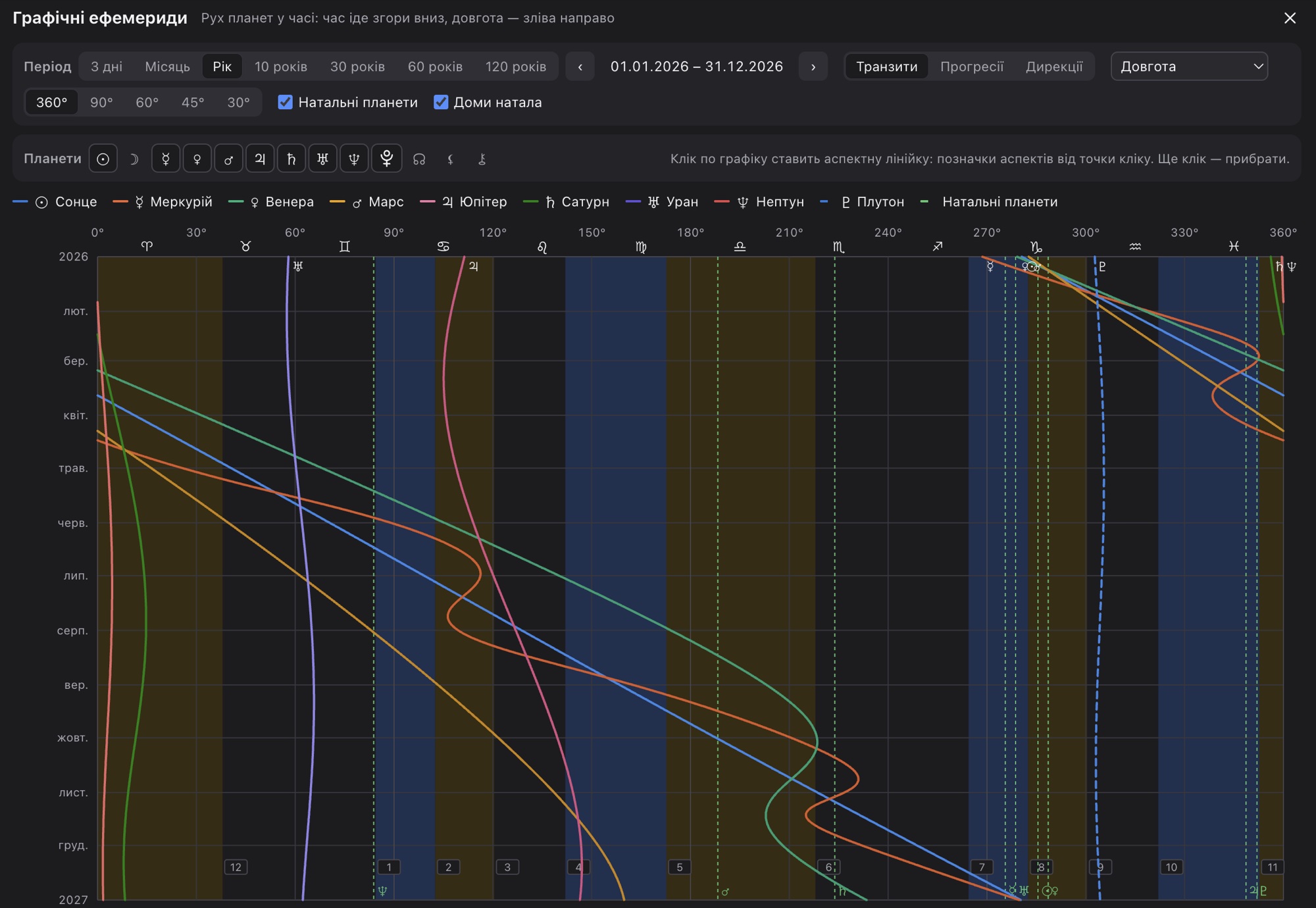
Graphical ephemerides plot planetary longitude day by day, overlaid with natal planets and chart houses. Click the graph to place an aspect ruler.
Time span
3 days to 120 years
Modes
transits, progressions, directions
Scale
360°, 90°, 60°, 45°, 30°
Switch from ZET 9 and keep your workflow
Keep your databases, terminology, and techniques. Zorya Astro opens ZET databases, uses familiar terms, and helps you find the functions you already know.
Familiar terminology
Ukrainian and Russian app terminology familiar to ZET users: aspect pages, chart type selector, and background data.
Database import and export
.zbs with a preview of every record. Export was tested against 18 databases from official ZET 9 files, byte for byte. Also .a2, .prs, .crt.
ZET shortcuts
F3 chart data, F4 chart type selector, F9 calculation settings. Cyrillic ZET shortcuts are supported too.
Search by ZET names
The ⌘K palette and “In ZET: …” hints next to buttons. Try it here.
132 ZET functions already available in Zorya.
Chart data ⌘E
In ZET: Chart Data · Horoscope → Chart Data · F3
Chart type selector F4
In ZET: Chart Type Selector · Control → Chart Type Selector · F4
Dignities ⌘4
In ZET: Chart Almuten · Chart Settings → Data
Zorya Astro is an independent application. It is not a Mac version of ZET: it is not affiliated with ZET 9's developers and includes none of its interpretation texts. Calculations use Zorya's own engine; some ZET features are still in development.
For professional chart work and the people learning it
Practising astrologers
Natal charts and forecasting, client databases with folders, events and history, professional techniques, astrology formula searches, and table export.
A general chatbot does not know your chart and can invent positions. Zorya Astro's assistant reads the open chart, calculates through the app's engine, and highlights its findings on the wheel. Zorya AI is an optional add-on.
1
Ask a question
Choose a mode: Auto decides what is needed; My Courses answers using only your materials; Generalmeans a general conversation. The Include Open Chart toggle gives the assistant access to your chart data.
2
The assistant uses the calculation engine
Positions, aspects, dignities, the chart ruler, and element balance come from Zorya's calculations rather than the model's memory. Auto mode also looks for the relevant rule in your course.
3
Highlights findings on the wheel
The planets, aspects, and houses being discussed are highlighted on the chart. The assistant first checks that they are actually present.
4
Check the sources
Each reference points to a video timestamp or PDF page in your course, and opens directly from the answer. Check calculations in the app's tables: the assistant does not replace an astrologer.
AI assistant
AutoMy CoursesGeneral
Include open chart
Find this chart's ruler and its scores
Chart ruler
Aspects: Mercury
Dignities: Mercury
Search your course
Highlighted on the chart
The chart ruler is Mercury. The Ascendant is in Gemini (24°25′), ruled by Mercury. Mercury is at 5°34′ Capricorn in the 7th house. Zorya calculated a conjunction with Uranus (orb 3°06′, applying) and a square to Mars (2°42′, applying). Under Lilly's dignities Mercury is in its own term, +2; under Ibn Ezra it is also the chart's almuten, with 26 points. Mercury, the Ascendant, and these aspects are highlighted on the wheel.
The chart ruler is Mercury. The Ascendant is in Gemini (24°25′), ruled by Mercury. Mercury is at 5°34′ Capricorn in the 7th house.
Zorya calculated a conjunction with Uranus (orb 3°06′, applying) and a square to Mars (2°42′, applying). Under Lilly's dignities Mercury is in its own term, +2; under Ibn Ezra it is also the chart's almuten, with 26 points. Mercury, the Ascendant, and these aspects are highlighted on the wheel.
1Your course — the lesson and timestamp discussing the ruler
Demo using Johannes Kepler's chart: positions, aspects, and scores were calculated by Zorya; the answer text is an example.
Example searches
“Find this chart's ruler and its scores”
“What aspects does Venus have, and which are applying?”
“What does my course say about the void-of-course Moon? Give me a lesson and timestamp.”
“How do secondary progressions differ from solar arcs?”
To answer, the cloud model receives your question, relevant course excerpts, and open-chart data when the assistant requests it.
Turn your courses into a searchable personal knowledge base
Add the video lectures and PDFs you already own. Zorya processes them on your Mac and finds the right passage in seconds.
Add your materials
A folder of videos and PDFs you already own.
Zorya processes them locally
Transcribes videos with built-in Whisper and builds a search index on your Mac.
Search by keywords and meaning
Find a lesson even when it uses different wording.
Open the exact passage
A video timestamp or PDF page; the assistant uses these excerpts in its answers.
Processing and search happen locally. When you ask the AI assistant, the cloud model receives your question and a few relevant excerpts, not your course files. Only add materials you have the right to use.
What changes in your daily work
Task
Typical workflow
With Zorya Astro
Find an explanation in video lectures
Scrub through recordings and try to remember which lesson covered it
Search all your courses by keywords and meaning, then jump to the right timestamp
Build a professional chart on Mac
ZET runs on Windows, so using it on Mac requires a virtual machine or another computer
A macOS app with professional astrology calculations
Move databases from your previous astrology software
Move charts manually or use intermediate formats
Import .zbs with a preview of each record and export back to ZET
Find an astrological event
Browse ephemerides or test dates one by one
Search for events using astrology formulas over a chosen period, with a chart for every result
Analyse a chart with AI
Copy positions into a chat and check that it has not invented them
The assistant reads your open chart, uses the calculation engine, and highlights findings on the wheel
Built for professional work you can verify
Data tab for Kepler's chart
Local time
27.12.1571 14:37 (Julian)
Offset
GMT+0:35:28
Universal time
6.01.1572 14:01:32 UT
Julian day
2295226.084398
ΔT
134.7 s
Sidereal time
21:37:33
Astronomical calculations
Ephemeris files cover 1200–3000. Outside this range, Zorya switches to Moshier theory and warns if any bodies cannot be calculated.
Your data stays on your Mac
Chart databases, courses, and their indexes are stored locally.
Offline atlas
229,000 places with historical time zones. Uncertain periods, such as wartime in Ukraine, are marked with warnings.
Your ZET databases remain yours
Import and export .zbs: you can move your charts back to ZET at any time.
Professional settings
House system, zodiac and ayanamsa, aspect pages with orbs, and topocentric settings.
Backups
Database backups and calculation history.
Every result can be checked
Positions, speeds, declinations, Julian date, ΔT, and sidereal time appear in tables beside the wheel. The engine was compared with examples from the ZET manual and USNO and NASA data; Vedic calculations were checked against Drik Panchang.
Pricing
All three options include the same full astrology feature set. Only access duration, renewal, and updates differ. Prices are in US dollars.
Questions and answers
How does Zorya Astro differ from ZET 9?
Zorya Astro is a separate macOS app. It preserves familiar ZET workflows, terminology, shortcuts, and database formats, and adds an AI assistant and course search. Its own engine performs calculations, so some results may differ from ZET due to settings. Some ZET features are still in development; the comparison section shows what is available and planned.
Can I import my ZET chart database?
Yes. Zorya imports databases in .zbs, previews every record before import, and flags uncertain entries: impossible dates, missing times, and Julian calendar dates. Import one database per file, as in ZET, or combine them into one. Export back to .zbs is also supported: it was tested on 18 official ZET 9 databases, all matching the originals byte for byte. Zorya also reads aspect pages in .a2, Arabic parts in .prs and formulas in .crt.
Is Zorya an official Mac version of ZET?
No. Zorya Astro is an independent app. It is neither affiliated with nor endorsed by the developers of ZET 9. ZET is mentioned only for comparison. Zorya includes none of ZET's interpretation texts.
Which computers can run Zorya Astro?
Mac computers with Apple Silicon (M1 or later), running macOS 13 Ventura or later.
Do I need a constant internet connection?
No. Calculations, the atlas, databases, and course processing work offline. The AI assistant needs an internet connection.
What does the monthly subscription include?
All astrology features, the same as Annual and Lifetime. Billing is monthly; cancel at any time and retain access until the paid period ends. Zorya AI is not included and is added separately.
How does Annual differ from Lifetime?
Annual is a yearly subscription: $69 for the first year at launch, then $99 per year, with updates while subscribed. Lifetime is a one-time $119 payment for the first 100 customers: keep your purchased version indefinitely, with 12 months of updates. The astrology features are the same.
What does a lifetime licence mean?
Pay once and use your purchased version indefinitely. Updates are included for 12 months after purchase. Future major versions may be sold separately.
Can I cancel my subscription?
Monthly can be cancelled at any time; access continues until the paid period ends. Zorya AI is cancelled separately. Annual renewal cancellation will be explained in the subscription terms, which will be shown before payment.
What happens to my charts after cancellation?
Charts and databases are files on your Mac; cancellation does not delete them. You can export databases at any time as .zbs. We will explain what remains accessible after a subscription ends in the licence terms before sales open.
Is AI included in the base price?
No. Zorya AI is an optional $10-per-month add-on for any plan. All astrology features are available without it.
How much does AI cost?
$10 per month in addition to your plan. AI usage is not unlimited: the add-on has a defined monthly allowance, which we will publish before sales open.
Can I use my own video courses and PDFs?
Yes. Add videos and PDFs, and Zorya transcribes and indexes them on your Mac. Search and the assistant refer to lesson timestamps or PDF pages. Only add materials you have the right to use.
Are my course materials kept private?
Course files, transcripts, and the index stay on your Mac and are not uploaded. When you ask the AI assistant, the cloud model receives your question, a few relevant excerpts, and open-chart data if the assistant requests it.
Can I switch from a subscription to Lifetime?
You can buy Lifetime while the offer is available. Before sales open, we will explain whether previous subscription payments will be credited.
Will there be updates?
Yes. Zorya is actively developed. Planned features include up to seven chart rings with aspect direction, time dynamics on the wheel, A4 PDF, PNG, and SVG chart export, in-app rectification, and an assistant following your course's methods. Monthly and Annual include updates while subscribed; Lifetime includes 12 months after purchase.
Be the first to know when Zorya rises
We are preparing Zorya Astro for launch. Leave your email and we will let you know when the app is ready to download.
No payment required. For Apple Silicon Macs.
Waitlist privacy
We store your email, signup date, and consent in Cloudflare. The Zorya Astro team will use your address to tell you about the app's launch. Joining does not make a purchase or subscribe you to promotional emails.
After your first signup, you will get a link to remove your registration. Save it in case you want to leave the waitlist later.